Shopify Time Savers When Setting Up Products

Shopify Time Savers When Setting Up Products

A Super Simple Time Saving Tip When Setting Up Products in Your Shopify Shop

Shopify’s “Duplicate” feature allows you to duplicate products when setting up products in your Shopify shop. Although you make changes to the title and product description, the basics such as

  • product tags
  • category
  • Region
  • taxes etc…

remain generally the same. This is where your time gets saved in picky little details.

However, the URL gets convoluted and if you don’t fix it while you are editing your product, you will have to go back in to each product separately, which is a big waste of time.

When you go to the bottom of the Product page to the Search engine listing preview you will see how the link includes the original copy of the link plus the new page title. To fix this, you must Edit Website SEO and delete the duplicate portion of the link.

Watch the video to see how easy it is to save time when setting up your Shopify Products store.

How To Do Your Very First Instagram Post

How To Do Your Very First Instagram Post

Getting Started with Instagram

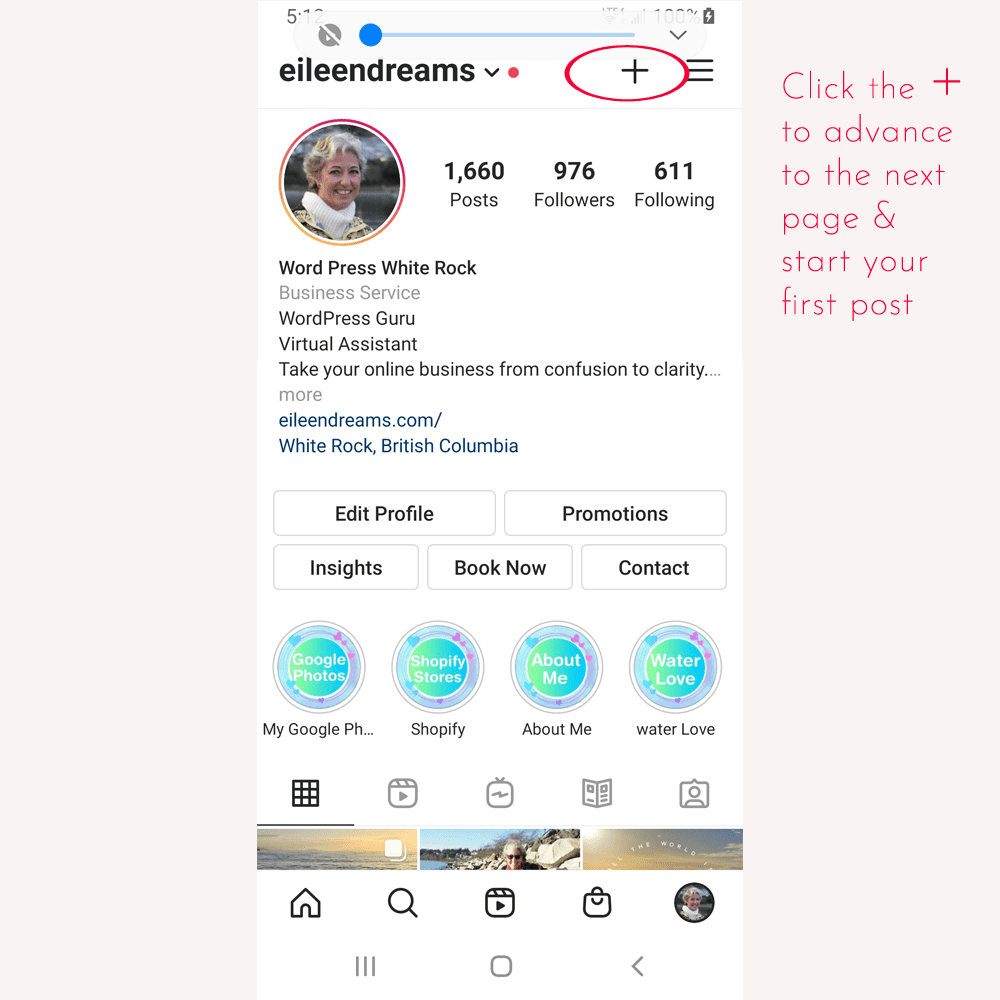
You can follow along with these screen shots of my phone as I create a post. Or, you can skip to the bottom of this page for a numbered list of directions.

 Open the Instagram app

Click on the + on the top right corner of your phone

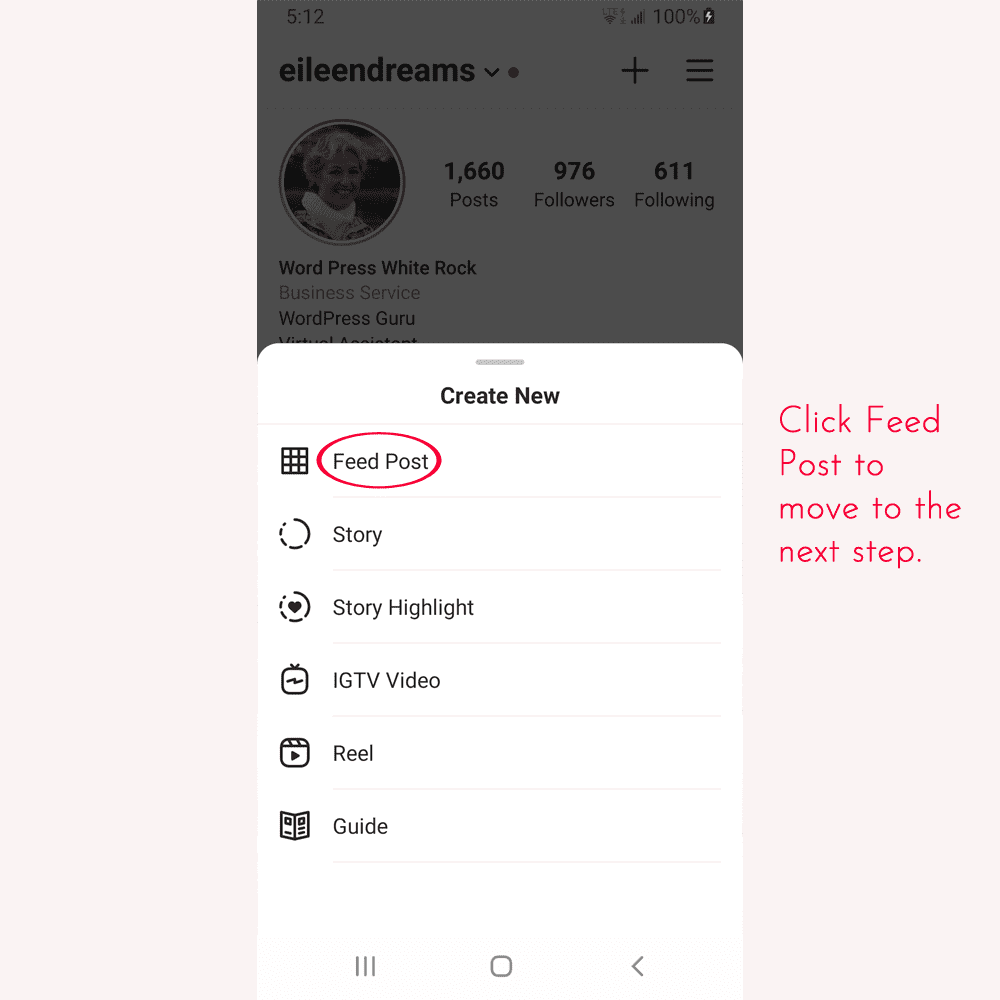
You will get a drop down called Create New that gives you options

Choose: Feed Post


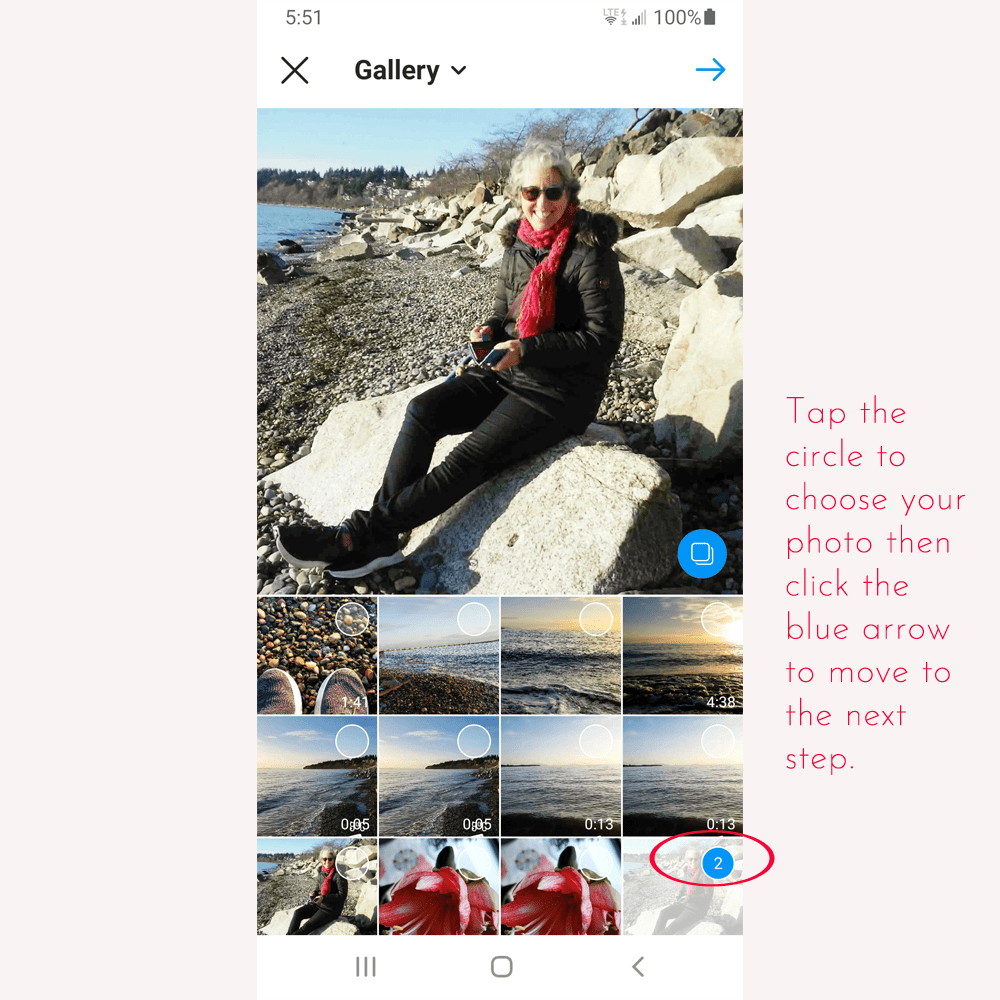
Choose your photo from your phone’s photo Gallery

Edit your photo,

straighten the horizon and choose a filter, if you want.

Click on the Blue arrow at the top right corner of your phone to get to the page where you write your message


Type over Write a caption….

Write a comment that add values and invites engagement

Add hashtags

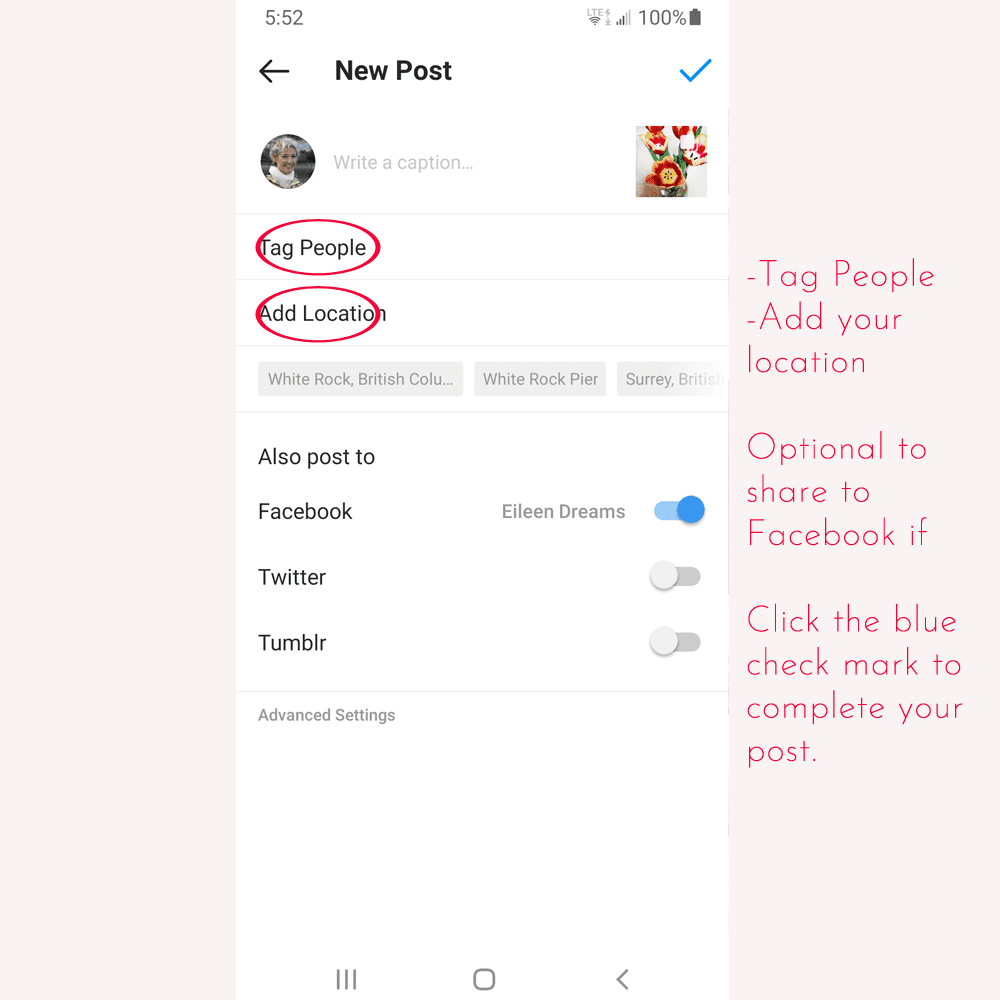
Tag People

Click on your photo and start typing your Instagram name to tag yourself or anyone in the photo

Tap the blue check mark at the top right of the page

Add location

Click on your photo and start typing your location to tag yourself or anyone in the photo

Share to Facebook

When your post is live answer people’s comments

First Steps to Make an Instagram Post

  1. Load the Instagram app on your phone.
  2. Open the Instagram app
  3. Click on the + on the top right corner of your phone inside the Instagram App
  4. You will get a drop down that gives you options.
  5. Choose Create New
  6. Choose: Create post
  7. Choose your photo from your phone’s photo Gallery

– Edit your photo,

– straighten the horizon, choose a filter, add text and stickers if you want

  1. Click on the Blue arrow at the top right corner of your phone to get to the page where you write your message
  2. Type over Write a caption….

– Describe your photo with a comment that add values and invites engagement.

  1. Add hashtags
  2. Tag People

– Tap on your photo and start typing your Instagram name to tag yourself or anyone in the photo

  1. Add location

– Click on your photo and start typing your location

  1. Share to Facebook if you want to
  2. Tap the blue check mark at the top right of the page to load your post

TaDa!! Good for you!! You did it! Have fun!!

I would love to know if this was helpful for you and what other questions you have. Please drop me a line or message me through Instagram.

Social Media Post Suggestions

Social Media Post Suggestions

Eileen’s Great Social Media Post Suggestions

When you are searching for content for your social media posts, work through this list for inspiration and ideas. Create your social media calendar by spreading these suggestions throughout the month.

Great Ideas for Your Social Media Posts:

  1. About Me

What is your why?
What makes you interesting?
What is your passion?

  1. Ask

You won’t get anything you don’t ask for. Ask for a follow, like, or share.

  1. Behind the scenes

Include staff stories
Share your process, messiness, or the “real” you (while being positive).

  1. Calendar Days

Observances – ie: Christmas, Easter, Diwali, Talk like a Pirate Day, etc…

  1. Community

Write about what is happening around your community or in the world.

  1. Educate

Provide value and information in your area of expertise.

  1. Encouragement

Share something positive that makes you feel good.

  1. Products and Services

What do you offer? What is interesting or special about your product or service?

  1. Quotes

Share a quote that resonates with you. Use pexels.com or unsplash.com if you don’t have your own photos and create a meme in canva.

Before you hit Post ask yourself these questions:

Is this interesting?
Are you adding value?
Would you talk like that to your mother?
Are you listening or yelling? Listen louder than you yell.
Are you being true and consistent to your brand?
Do you know your audience? Are you wasting their time or adding value to it?
Are you being appropriate to the platform and your tribe?
Consider your hook, your insights, and your call to action on every post.

Finally, make sure you proof read your post!

Click here for a downloadable file of this post.

First 3 Steps to Get Your Business Online

First 3 Steps to Get Your Business Online

The First 3 Steps to Getting Your Business Online

  1. Secure your name
  2. Choose your platforms
  3. Choose a host

1. Secure your name

I am Canadian so I start with both .ca and .com top level domains for my website name.  Even if you don’t want to use all the social media platforms right now, secure your name for the future. I start with https://www.namecheckr.com/ to make sure I get the same name for Facebook, Twitter, LinkedIn, Instagram etc.

2. Choose Your Platform

Website Platform Consider starting with a landing page for your business website if you aren’t ready to start with a full feature website. You will have an online presence while you create content for your website. First you need to decide which platform is best suited to your needs. There is oodles of information about which platform is best. But, the question you need answered is:

Which platform is best for you?

I use Word Press. The downside is that there requires some learning depending how comfortable you are with technology. You could hire a designer to get you started and then take over for updates. Once your theme and template is set up, it is an easy blogging platform. You are not limited to what you do and you have complete control for future growth. The top three ecommerce website builders for small businesses are Wix, Squarespace, and Shopify. But it is like renting. You don’t own your site.

Shopify – Easy set up for an online store. Easily manages multiple payment methods and outranks other website builders in SEO.

Etsy – Showcase and sell homemade goods online

Wix – Simple way to set up a landing page.

Social Media Platforms

LinkedIn – Validate your business

Facebook business page – For followers and visibility

Instagram – Visually interesting way to gain followers,

TikTok, Twitter, SnapChat etc….. You don’t need to start with all the social media platforms. It is better to do a great job of one platform than a mediocre job of several platforms. As long as you have reserved your name, you can jump on to new platforms when you are ready. The most important consideration is to choose a platform where your ideal clients frequent.

3. Choose a host

Your host is the server where your website lives. Ideally, your host should have:

-Geo-redundant servers

-Automatic free back-ups

-Free 24 hour phone tech support

-Easy integration of third party apps (ie: WordPress, Joomla)

I use Ionos. I probably pay a bit more for their service but it’s like paying cheap insurance for when a website goes down or gets attacked. I know that I can phone them in the middle of the night and get an immediate resolution.

If you don’t know where to start with getting your business online these are the first three decisions you need to make. I have been setting up and managing websites for almost 20 years. My clients range from having me set up and maintain their websites and social media to passing over complete control to them. Some don’t want to know anything tech related and for others, I only step in when they have a problem. My clients are all experts in their fields, we just have different knowledge bases. Zooming with them to meet their needs is the best part of our online experience. If you have more specific questions, you can send me an email: Eileen@eileendreams.ca and I will give you a free 30 minute consultation.


Scams

Scams

Photo by Jefferson Santos on Unsplash

Domain Renewal Scams and Search Engine Scams

So many of my clients have received emails like this that I feel I should warn people.

Emails like this:

Don’t miss out on this offer which includes search engine submission for “InsertYourdomainnamehere”.com for 12 months. There is no obligation to pay for this order unless you complete your payment by 3/10/2019. Our services provide submission and search engine ranking for domain owners. This offer for submission services is not required to renew your domain registration.

Failure to complete your search engine registration by 3/10/2015 may result in the cancellation of this order (making it difficult for your customers to locate you using search engines on the web).

Then they include a big colourful link to make your payment.
Normally I don’t rant but this really frosts me. This part here:

“(making it difficult for your customers to locate you using search engines on the web).”

is a big fat lie!! don’t believe it! These are not SEO companies. You can submit your own website for SEO if you want. Plus, it is free to submit your website to search engines. If you need help with SEO, hire a Company or person you know and trust.

Plus, to make it look like they are complying with the new CASL laws they add an address to make their scam look legitimate:

You have received this message because you elected to receive special notifications and offers. If you no longer wish to receive our special notices, please unsubscribe here,(No Don’t! Block the sender or flag it as junk!) or mail us a written request to the attention of: Customer Contact Manager, PO Box 4668 New York, NY 10163. Please allow up to four weeks for the complete unsubscribe process to take place. NOTE: If you have multiple accounts with us, you must opt out for each one individually in order to fully stop receiving these notifications. This message is CAN-SPAM compliant. (No it isn’t!)
Please do not reply to this email, as we are not able to respond to messages sent to this address.

This should be a big red flag. Legitimate companies allow you to reply.

Do a Google search for the address. This particular address has 5 businesses at this PO box. None of which are Tech or SEO Companies.

If you receive a notice that your domain is expiring, phone your host before handing over money. Another email scam that my clients often contact me about is domain renewal. They receive an email saying that their domain is about to expire and if they don’t pay now they will loose their domain. These emails are quite clever and it is easy to be fooled by them. This really frosts me. Not only do they get your money under false pretenses they steal the domain from your registrar and possibly even steal it from you.

So, please be very careful when renewing your domain.